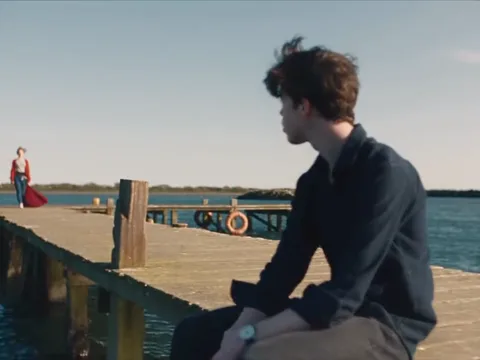
Waiting on the pier
The scene opens on a wooden pier in bright daylight. The person from your first photo sits at the edge and looks out over the water while the second person appears at the far end and walks toward them.
 Raindance AI
Two photos. One pier scene. Choose who waits by the water and who takes the lead.
JPG or PNG · up to 10 MB each
Couples, footballers, pets and cartoon characters in the same pier scene.
Start with the people. The pier scene is already prepared.
Upload a photo for the person sitting on the pier and another for the performer. Their roles are shown directly below each slot. You can replace either photo or swap the two positions before generating.
Watch the template, check the roles and review the credit cost. Sign in to keep your work with your account, then click Create my video. The studio keeps the inputs while the task runs.
Your finished video takes the place of the template player. Download the MP4 or find it again in Your videos. Add your chosen audio when sharing it in TikTok, Reels or your editing app.
A wait on a sunny pier, a close-up performance and a sunset on the beach.
The scene opens on a wooden pier in bright daylight. The person from your first photo sits at the edge and looks out over the water while the second person appears at the far end and walks toward them.
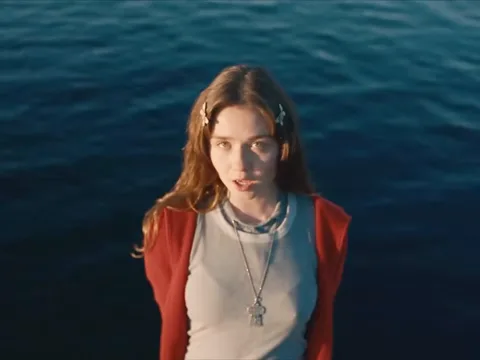
The singer from your second photo takes over in a close-up, singing straight to the camera with the blue sea behind them. This is the moment people recognize from the trend.
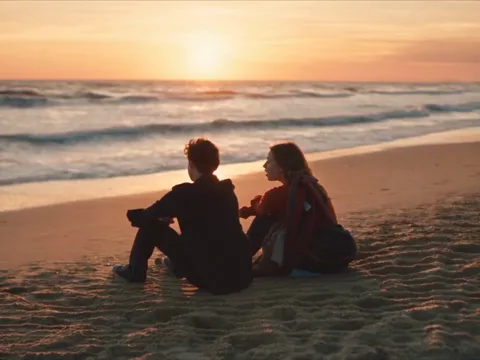
The two meet on the pier, and the clip closes with both people sitting side by side on the sand as the sun goes down. Each role keeps the face from the photo you chose.
The Raindance AI trend puts a new cast into the pier scene from the music video for Raindance by Dave and Tems. One person sits on a wooden pier in bright daylight, the other walks in and sings to the camera, the two meet on the pier and the video ends on a sunset beach. People fill the two roles with partners, friends, pets, footballers and cartoon characters.
This preset follows that scene in eight seconds, in the same landscape 4:3 frame as the trend videos. Your photos choose the two people and their roles. You can watch the template before uploading and keep the resulting clip with your account. If you already have a different scene in mind, the custom video editor remains available from the studio.
Choose a single video or buy a credit package for more takes. The studio shows the exact credit cost of your scene.
A one-time purchase adds the credits your current balance needs for one video. Your photos stay ready when you return; review them and click Create to start the render.
View all plans and credit packages →Photos, roles, credits and your finished video.
The Raindance AI trend is a short seaside video with a new cast. One person waits on a wooden pier and another walks toward them and performs to the camera. Your two photos provide the people; the built-in reference supplies the scene, camera movement and shot sequence.
Add one JPG or PNG for each role, up to 10 MB per photo. Put the seated person in the first slot and the singer in the second. You can change a photo or exchange the roles before generating. The reference video is already included, so you do not need to find a clip or write a prompt.
Yes. The slot marked The singer supplies the person who walks toward the seated character and performs in the closer shots. Sitting on the pier supplies the character waiting by the water. Exchange the photos with Swap roles if you want the other person to perform.
The exact credit cost appears beside Create my video before you submit. If your balance is too low, you can buy the credits needed for this video or choose an existing credit package. Signing in and returning from payment keep your two photos ready; creating the video still takes a separate click.
The pier scene is eight seconds at 720p in a landscape 4:3 frame, the same shape as the trend videos. It covers the seated person, the singer's close-up, the two together on the pier and a sunset view on the beach. The player shows the scene you are choosing, and the downloaded MP4 uses that same fixed format.
Processing time depends on the model queue. The task appears in your account while it runs, and the scene area shows whether it is generating or saving the finished file. You can leave the page and return to view the result. No further submission is needed to keep a running task moving.
The pier video is silent. After downloading it, add the sound you want in TikTok, Instagram or your editing app. The output has no generated song or voice, so you can choose the audio segment and position it yourself.
The task shows the reason and the current credit-refund status. Your two photos stay in the studio so you can adjust the inputs. Review the task before creating another video: a new attempt has its own displayed cost and starts only when you click Create again.
Your finished video plays in the scene area and also appears in Your videos. Use Download video to save the MP4. Your account keeps the task and result available when you return, and the same history includes any videos you made with the custom editor.
Choose Use your own video in the studio. The custom editor offers Motion Transfer and Object Swap with their existing video, reference-image and quality controls. The Raindance preset keeps those technical choices fixed for the pier scene; the custom editor lets you work on a different clip.
Raindance is a song by Dave featuring Tems. AI in this tool refers to the visuals you make from photos. The seaside setting and two-person performance describe the video format, while the soundtrack is added separately when you publish.
Choose the two people and give each one their part.
Choose your cast